Comparison guide
MacBook Air 13 (M3) vs MacBook Air 15 (M3): which should you choose?
MacBook Air 13 (M3) and MacBook Air 15 (M3) compared under one framework. Decision axes: sustained performance, memory headroom, display, battery life, carry weight, and expandability. Includes price context and category-specific tradeoffs.
Published: 2026-08-16 · Updated: 2026-08-16
Laptops verdict
Keeping the current product is reasonable. The products share a category but prioritize different strengths. The figures below use the same weighting model and stored representative configurations; confirm the configuration and price on the merchant page before buying.
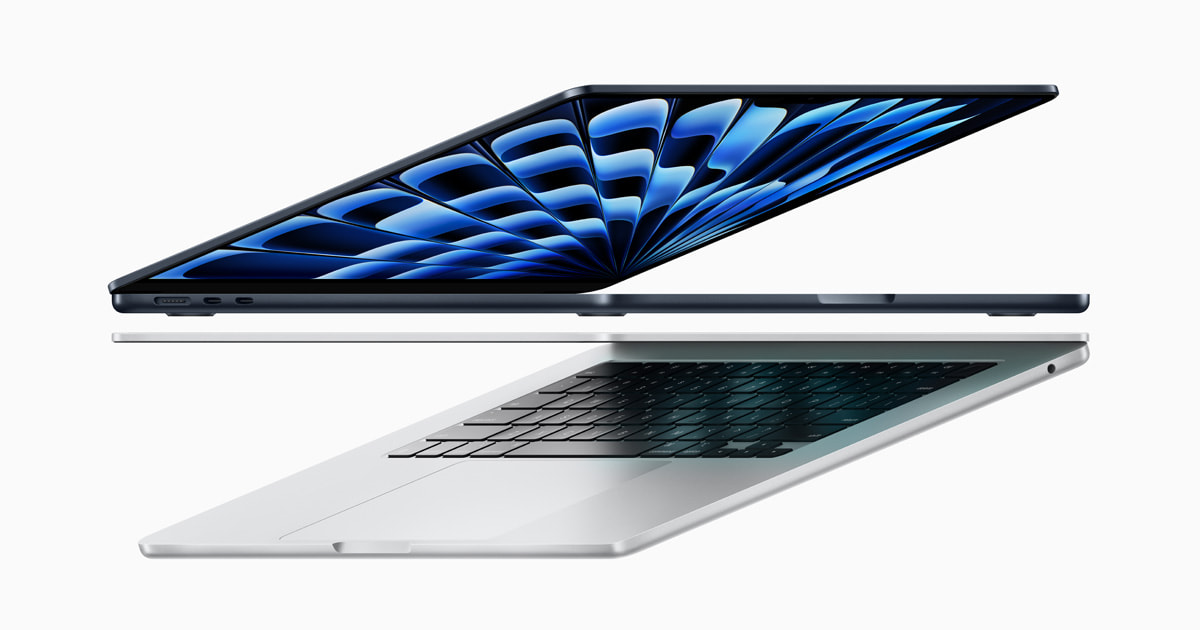
- MacBook Air 13 (M3): Silent and fanless with all-day battery — the 13-inch Air, the standard for everyday work.
- MacBook Air 15 (M3): The 15-inch Air for those who want a big screen without the weight — and better speakers too.
- Upgrade recommendation: 49 / 100
- Data completeness: 100%
Choosing between MacBook Air 13 (M3) and MacBook Air 15 (M3) starts with the real use case and the problem to solve, not with which product is newer. Use context: the longest sustained workload across documents, development, editing, 3D, and games. Decision axes: sustained performance, memory headroom, display, battery life, carry weight, and expandability. This guide applies one calculation model to stored representative configurations while keeping the category-specific decision order visible.
Core specifications on one baseline
| Item | MacBook Air 13 (M3) | MacBook Air 15 (M3) | Delta |
|---|---|---|---|
| CPU | 88 score | 88 score | Same |
| Graphics | 78 score | 78 score | Same |
| Memory | 16 GB | 16 GB | Same |
| Display | 84 score | 85 score | +1.2% |
| Battery | 92 score | 91 score | -1.1% |
| Carry weight | 1.24 kg | 1.51 kg | +21.8% |
| Value | 78 score | 76 score | -2.6% |
| battery_wh | 52.6 Wh | 66.5 Wh | +26.4% |
| display_nits | 500 nits | 500 nits | Same |
| refresh_hz | 60 Hz | 60 Hz | Same |
| thunderbolt_ports | 2 | 2 | Same |
| Chipset | Apple M3 | Apple M3 | Same |
| Color | Midnight | Space Gray | Different |
| Connectivity | 2x Thunderbolt 3, MagSafe 3, 3.5mm, Wi-Fi 6E, Bluetooth 5.3 | 2x Thunderbolt 3, MagSafe 3, 3.5mm, Wi-Fi 6E, Bluetooth 5.3 | Same |
| CPU model | Apple M3 8-core CPU | Apple M3 8-core CPU | Same |
| GPU model | Apple M3 10-core GPU | Apple M3 10-core GPU | Same |
| Lineup | MacBook Air | MacBook Air | Same |
| Operating system | macOS Sonoma | macOS Sonoma | Same |
| Panel quality | 13.6" Liquid Retina IPS 2560x1664 | 15.3" Liquid Retina IPS 2880x1864 | Different |
| Region | GLOBAL | GLOBAL | Same |
| Screen size | 13.6 in | 15.3 in | +12.5% |
| Storage | 512 GB | 512 GB | Same |
CPU
The cpu score is 88.0 for MacBook Air 13 (M3) and 88.0 for MacBook Air 15 (M3). The two products are level here. It is a relative index combining CPU-heavy work such as compiles, documents, browser loads, and encoding on one baseline. Read the underlying specification rows, source completeness, and exact selling configuration before treating the lead as decisive. Similar averages can hide different weak points, so a small point gap matters less than whether the product removes a concrete problem under your normal usage conditions.
Graphics
The graphics score is 78.0 for MacBook Air 13 (M3) and 78.0 for MacBook Air 15 (M3). The two products are level here. It is a relative index combining sustained 3D, video effects, GPU-accelerated apps, and gaming on one baseline. Read the underlying specification rows, source completeness, and exact selling configuration before treating the lead as decisive. Similar averages can hide different weak points, so a small point gap matters less than whether the product removes a concrete problem under your normal usage conditions.
Memory
The memory score is 80.0 for MacBook Air 13 (M3) and 80.0 for MacBook Air 15 (M3). The two products are level here. It is a relative index combining headroom for concurrent apps, tabs, and large projects on one baseline. Read the underlying specification rows, source completeness, and exact selling configuration before treating the lead as decisive. Similar averages can hide different weak points, so a small point gap matters less than whether the product removes a concrete problem under your normal usage conditions.
Display
The display score is 84.0 for MacBook Air 13 (M3) and 85.0 for MacBook Air 15 (M3). MacBook Air 15 (M3) leads this dimension. It is a relative index combining resolution, brightness, color rendering, and long-session readability on one baseline. Read the underlying specification rows, source completeness, and exact selling configuration before treating the lead as decisive. Similar averages can hide different weak points, so a small point gap matters less than whether the product removes a concrete problem under your normal usage conditions.
Battery
The battery score is 92.0 for MacBook Air 13 (M3) and 91.0 for MacBook Air 15 (M3). MacBook Air 13 (M3) leads this dimension. It is a relative index combining real workload runtime, display brightness, and time away from a charger on one baseline. Read the underlying specification rows, source completeness, and exact selling configuration before treating the lead as decisive. Similar averages can hide different weak points, so a small point gap matters less than whether the product removes a concrete problem under your normal usage conditions.
Carry weight
The carry weight score is 74.0 for MacBook Air 13 (M3) and 67.3 for MacBook Air 15 (M3). MacBook Air 13 (M3) leads this dimension. It is a relative index combining the daily carry burden of the laptop and its charger on one baseline. Read the underlying specification rows, source completeness, and exact selling configuration before treating the lead as decisive. Similar averages can hide different weak points, so a small point gap matters less than whether the product removes a concrete problem under your normal usage conditions.
Value
The value score is 78.0 for MacBook Air 13 (M3) and 76.0 for MacBook Air 15 (M3). MacBook Air 13 (M3) leads this dimension. It is a relative index combining performance, base memory and storage, warranty, and expandability for the price on one baseline. Read the underlying specification rows, source completeness, and exact selling configuration before treating the lead as decisive. Similar averages can hide different weak points, so a small point gap matters less than whether the product removes a concrete problem under your normal usage conditions.
Who should choose MacBook Air 13 (M3)
MacBook Air 13 (M3) is the stronger fit when its leading dimensions match your primary use. Configuration checks: CPU and GPU, memory, storage, display, ports, weight, and battery capacity. Then ask whether the product removes a concrete problem with the device you already own. If the gap is small and there is no real pain point, waiting for a price drop or a change in workload can be more rational than upgrading for novelty alone.
Who should choose MacBook Air 15 (M3)
MacBook Air 15 (M3) is the better fit when more of its strengths overlap your priorities and its weaker dimensions remain acceptable. Switching costs: operating system and app licenses, docks, chargers, peripherals, data migration, and repair policy. A higher total can still deliver lower practical value when that burden is large, so compare the score lead and switching cost on the same baseline.
How to read price and purchase availability
Neither product currently has an approved purchase link whose product name and configuration match the catalog, so no merchant link is shown. AsKrs does not guess a destination; this guide provides specifications and decision criteria until an exact listing is verified.
- MacBook Air 13 (M3) · No verified purchase link currently available
- MacBook Air 15 (M3) · No verified purchase link currently available
Final decision checklist
- Use context: the longest sustained workload across documents, development, editing, 3D, and games.
- Configuration checks: CPU and GPU, memory, storage, display, ports, weight, and battery capacity.
- Switching costs: operating system and app licenses, docks, chargers, peripherals, data migration, and repair policy.
- When the score gap is small, identify the concrete problem the change will solve.
- Recheck the seller, delivery, return terms, condition, and current price at checkout.
Scope and limits of this comparison
This comparison is a structured decision aid built from published specifications and stored representative configurations. Scope and limits: application optimization, sustained-load heat and noise, battery wear, and panel variance. The scores are relative indicators for setting priorities within one category, not an absolute quality ranking. When a new configuration or verified specification becomes available, the catalog and its comparison pages are regenerated together.
Open the full configuration-level comparison and upgrade score